
If you have ever opened an IPTV app and seen a schedule showing what is playing on each channel, you have already used an EPG. Short for Electronic Programme Guide, it helps you find programmes, check broadcast times and decide what to watch without switching through every channel.
For viewers in Australia, an EPG can make an IPTV service easier to navigate. However, its usefulness depends on accurate listings, correct channel matching and time settings that reflect your location.
This guide explains how EPG works, how it differs from a channel playlist and what to check when programme information is missing or incorrect.
What Is EPG on IPTV?
An Electronic Programme Guide is a digital television schedule displayed inside a compatible IPTV player.
Instead of showing only channel names, it adds information about the programmes available on those channels. Depending on the guide source, this can include:
- Programme titles.
- Start and finish times.
- Show descriptions.
- Episode details.
- Programme categories.
- Current and upcoming listings.
Think of it as a television guide built into your streaming app. It tells you what is scheduled, but it does not supply the video itself.
How Does EPG Work on IPTV?
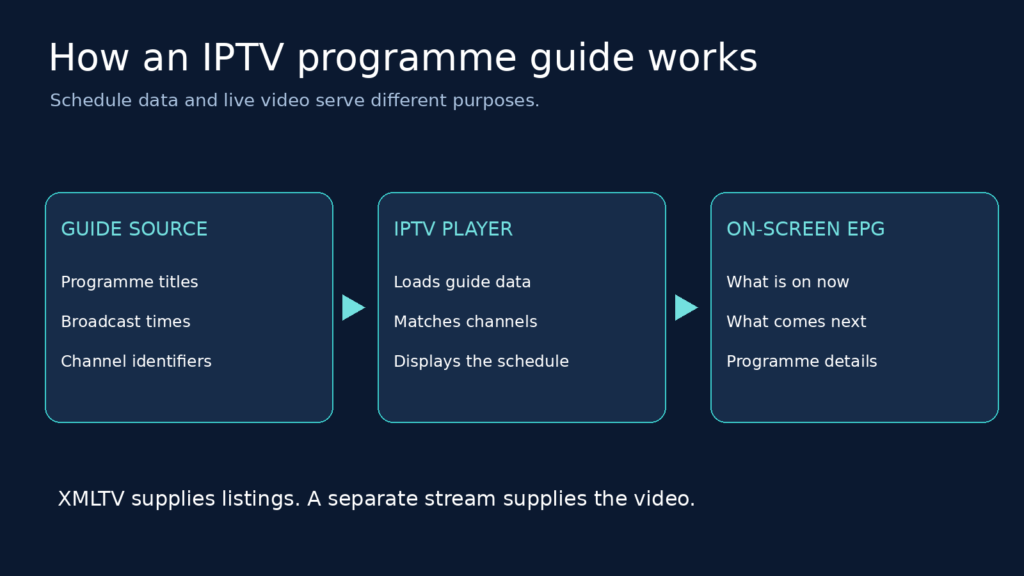
An IPTV guide brings together schedule information, channel identifiers and your player’s display features.
1. A Source Supplies Programme Listings
The process starts with a source that provides television schedules. This might be your IPTV service or a separate guide provider.
The schedule needs to use a format your application understands. XMLTV is one format used to organise channel and programme information.
The official XMLTV project provides tools and documentation for gathering and processing television listings in this format.
2. Your IPTV Player Loads the Guide
Your player retrieves the schedule information from a file or web address. Depending on your service, guide access may be configured automatically through your account or entered separately as an EPG URL.
The app then reads the available programme titles, broadcast times and other details.
A guide can only display the information supplied by its source. If a provider has no listings for a particular channel, the app cannot create those listings on its own.
3. The Player Matches Listings to Channels
The player must connect each schedule to the correct channel in your playlist.
This often involves a channel identifier. For example, a playlist may use a tvg-id value that corresponds to a channel identifier in the XMLTV guide.
If the identifiers do not match, a channel may play successfully while its guide remains empty. Some players allow manual channel mapping to resolve this.

4. The Schedule Appears on Screen
Once the information is loaded and matched, your app displays the guide.
Depending on the player, you might see:
- A grid with channels on one side and programme times across the top.
- A list of what is currently playing.
- A “now and next” view.
- A detailed schedule for an individual channel.
The same guide data can look different in different applications.
Why Is EPG Useful for IPTV Viewers in Australia?
A channel list tells you where to watch. An EPG helps you decide what to watch and when.
Find Programmes Without Opening Every Channel
Programme titles and descriptions let you browse your options before starting a stream. This is particularly useful when your playlist contains many channels.
Check Upcoming Broadcasts
A guide lets you look ahead to see when a programme is scheduled to start. The number of future days available depends on the source; not every EPG provides the same amount of coverage.
Check Listings Against Your Local Time
For an Australian viewing setup, check that your device and player use the correct local time settings.
If the schedule does not match what is actually playing, review the device clock, time zone and any guide offset before changing other settings.
Understand What Is Playing
A channel name alone does not explain which film, episode or news programme is on. A detailed guide adds that context, provided the source includes it.
EPG vs IPTV Playlist: What Is the Difference?
An IPTV playlist and an EPG work together, but they perform different jobs.
| Feature | IPTV playlist | EPG |
|---|---|---|
| Main purpose | Helps the player locate channels and streams | Shows programme schedules |
| Typical information | Channel names, stream addresses and identifiers | Programme titles, broadcast times and descriptions |
| Common format | M3U | XMLTV |
| Provides the video itself? | Points the player towards the stream | No |
| Can be used separately? | Channels may play without guide data | Listings do not provide access to streams |
This distinction explains a common situation: the television channel works, but the guide displays “No information.”
In that case, the stream may be functioning correctly while the schedule is missing, outdated or incorrectly matched.
How to Set Up EPG on an IPTV Player
Exact instructions vary by app, but the general process is similar for players that support a separate XMLTV source.
1. Get Your Guide Details
Ask your authorised service provider whether guide access is included.
You may receive:
- An XMLTV URL.
- A downloadable guide file.
- Account details that allow the player to configure the guide automatically.
Do not assume that a playlist address and a guide address are interchangeable.
2. Open the Guide Settings
Look for a section called EPG, TV Guide or Programme Guide in your player.
Some applications place these options inside the settings for an individual playlist.
3. Add the EPG Source
Enter the guide URL or select the appropriate file.
If your player supports multiple playlists, make sure the guide is associated with the correct one.
4. Refresh the Guide
Save your changes and use the player’s refresh or update option.
Allow the guide to finish loading before checking whether programme listings have appeared.
5. Check Channels and Times
Open several channels and compare their listings with what is playing.
If information appears under the wrong channel, check the mapping. If listings appear at the wrong time, check your clock, time zone and guide offset settings.
Common EPG Problems and How to Fix Them
The Guide Shows “No Information”
This can happen when:
- The guide URL is incorrect.
- The source is unavailable.
- The source does not cover the channel.
- The playlist identifier does not match the guide identifier.
- The guide has not refreshed successfully.
Start by checking the source address and refreshing the guide. If only some channels are affected, check their coverage and mapping rather than replacing the entire configuration.
Programme Times Are Wrong
First, check your device’s date, time and time zone.
Next, review any EPG time-shift setting in your player. An unnecessary offset can move otherwise correct listings away from their intended times.
If only one or two channels are affected, compare their listings with the broadcaster’s published schedule. The problem may be in the source data rather than your overall setup.
For Australian channel schedules, official broadcaster websites such as ABC TV and SBS provide useful places to check programme information.
The Guide Displays Old Programmes
Try refreshing the guide and checking that its source is still accessible.
If the source itself contains outdated information, repeated refreshes will not solve the problem. The provider needs to supply a current schedule.
Some Channels Have Listings and Others Do Not
A guide does not necessarily cover every channel in a playlist.
Check whether the missing channels exist in the guide source. If they do, review their identifiers or use your player’s manual mapping feature where available.
Does EPG Give You Catch-Up TV?
No. A programme guide and catch-up television are separate features.
An EPG shows schedule information. Catch-up requires access to a recording or replay supplied by the service, along with support in your player.
A programme appearing in yesterday’s guide does not automatically mean you can watch it again.
Can EPG Record Programmes?
An EPG does not record video by itself.
Some applications or recording systems can use programme listings to help schedule a recording. However, recording depends on separate software features, storage and access to the stream.
The guide supplies the timing information; the recording system performs the recording.
How to Choose a Useful EPG Source
When evaluating a guide for your Australian viewing setup, consider:
- Channel coverage: Does it include the channels you actually watch?
- Accuracy: Do programme titles and times match the broadcasts?
- Compatibility: Can your player read the supplied format?
- Updates: Does the source keep its listings current?
- Detail: Does it include descriptions and episode information?
- Support: Are there clear instructions for setup and troubleshooting?
A smaller guide with accurate coverage of your channels can be more useful than a large guide filled with missing or mismatched listings.
For more information about the underlying format, explore the XMLTV documentation and tools.
Frequently Asked Questions
What Does EPG Stand For?
EPG stands for Electronic Programme Guide. It is the digital schedule that shows what is currently playing and what is coming next on television channels.
Can I Watch IPTV Without an EPG?
Yes. A channel can work without programme listings because the stream and the schedule are separate.
You can still select channels manually, but you will not have the same programme information available inside the player.
Is EPG Free?
That depends on the source. Guide access may be included with a service, provided separately or offered through another listings provider.
Check the source’s pricing and usage terms rather than assuming all guide data is free.
Why Is My EPG Showing the Wrong Time in Australia?
Possible causes include an incorrect device time zone, an unnecessary guide offset or inaccurate timestamps in the source.
Check your device settings first, then compare several channels before applying a time adjustment.
How Many Days Does an EPG Show?
There is no fixed number. The available schedule depends on the guide source and how much information your player downloads and retains.
Does EPG Provide Access to Australian TV Channels?
No. An EPG supplies programme information, not permission or access to a channel.
You still need an authorised source for the television stream itself.
Final Thoughts
An EPG makes IPTV easier to navigate by turning a basic channel list into a useful programme schedule.
For viewers in Australia, the most important checks are channel coverage, accurate matching and correct local time settings. With those elements in place, you can spend less time searching through channels and more time choosing what to watch.